
Anyone can make a mistake when filling out a form. The good news is that forms will tell you which field you made a mistake on. The bad news is that if you make several errors on a long form, you’ll end up with a long list of corrections when trying to submit the form.
This can create too much work for users on a long form because the chance of making mistakes are higher. The more fields on the form, the more information users have to enter which can cause more typing errors.
Instant Validation for Faster Error Correction
A faster and more efficient way to validate user input is to use instant inline validation. Instant inline validation gives users instant feedback on whether the input they entered is valid. This approach allows users to correct the errors they make sooner without having to wait until they press the submit button to see their errors.
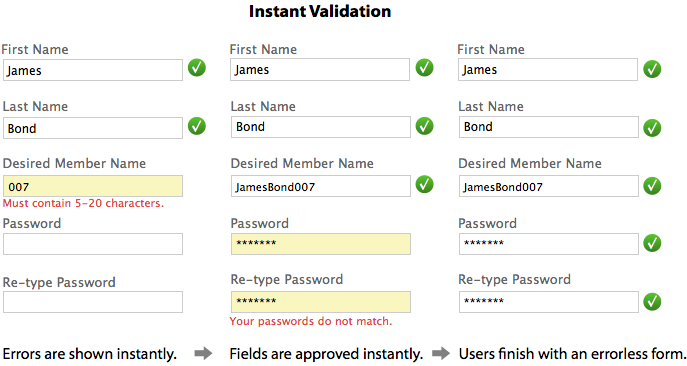
Instant inline validation should not only tell users what they do wrong, but it should also tell them what they’re doing right with green checkmarks. This gives users more confidence to continue the form without worrying about their input.
This is especially useful for fields that could have various input formats users are unsure about. Any anxiety the user has about their input goes away immediately when instant validation approves of their input for each field.
With instant inline validation, users move forwards not backwards when they fill out forms. Never before did users have the power to fill out forms correctly the first time they submit it. What users want to see the most when they complete a form is the success message, not a long list of errors they have to fix.
jQuery Plugins
Book

Affiliate

Each to their own, I suppose, but I find it a bit annoying and — perhaps more importantly — distracting when client-side validation sticks a warning message or icon next to the input that I last used, as soon as I have tabbed from it.
As a user, I expect error messages, should any be needed, to be shown after submission. It’s a convention that feels normal and right and it allows the user to deal with errors in his own time and in an orderly way.
JS validation feels too assertive and, as a result, it tends to get in the way of the process rather than easing it.
Still, at least your suggestion is not as bad as the on-the-fly validation that insists that your e-mail address is invalid just as you start to type it.
(Incidentally, it’s poor form to require someone to use a JS-enabled browser just to submit a comment.)
Please everybody interested in inline form validation also read LukeW’s Article with insights from usability testing: http://www.alistapart.com/articles/inline-validation-in-web-forms/