Why Users Fill Out Forms Faster with Top Aligned Labels
by anthony on 09/01/10 at 3:48 pm
Imagine a user who is really excited about your product or service. They’re ready to sign up, so they go to your form page and start filling out their information. The way you align your labels with your form fields can affect how easy it is for users to fill out the form. Do you want to give users a quick, easy and painless experience or do you want to give them a hassle? If you want to make their experience quick, easy and painless, consider using top aligned labels for your form fields.
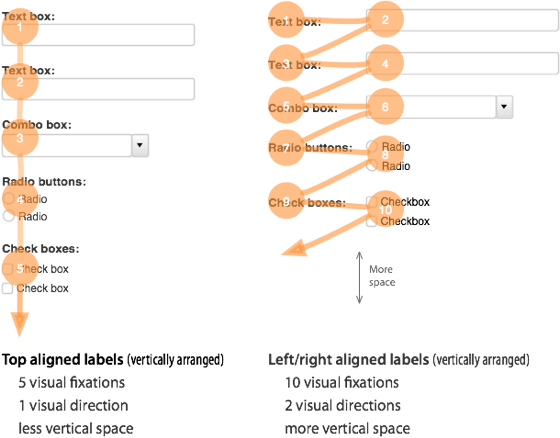
Top aligned labels are faster and easier to fill out than left or right aligned labels. This is because top aligned labels require half as many visual fixations than left or right aligned labels. Top aligned labels also allow users to move down the form in one visual direction, instead of two visual directions with left and right aligned labels. This makes filling out forms quicker and easier.
The only drawback with top aligned labels is that they can make the form long. However, on the web, where users scroll often, this doesn’t seem like a big problem. In fact, by reducing the font size of the labels and the whitespace between fields you can decrease the form length. You can also break the form up into multiple pages to make each part of the form shorter.
The difference is clear. Top aligned labels are easier on the eyes, and make long forms simple and easy to fill out. Even though they may make forms look longer, when the user actually uses the form they’ll notice a dramatic difference in the time and effort it takes to complete the form. If users are able to have a better experience with forms, then using top aligned labels is well worth it. The form experience is an important aspect to web design. Designers should carefully think about how they align form field labels because it can often make the difference between a user completing the form or abandoning it.


TechuilaSMO
Sep 2nd, 2010
I agree with Jones, it would be cool to see some A/B test data. It’s hard for me to guess which way layout would lead to faster fill-ins but I think it will hinge on the form-fillers’ experience with forms.
Another factor: the side aligned labels are closer together, which would make it quicker for form fillers who click on each text box. (pro form fillers use the TAB button).
Also, a lot of form fields are universal and people may just skip reading them out of habit.
Sean
Sep 2nd, 2010
[citation needed]
By the way, I find it interesting that the labels for the reply form for this blog are on the right.
PradeepVizz
Sep 2nd, 2010
Good logical post. On the other side, label inside the UI control would also save the space
Josh L
Sep 2nd, 2010
Wow, I can’t believe I never really thought about this before. Great writeup.
Even in this era of the web where “the fold” doesn’t mean much anymore, the golden rule that never fails during my A/B testing is that the exact same form with one extra field always results in less conversions. For example, a simple three-field form that asks for name, email, and comments will convert better than the exact same form where the name field is split into first and last name fields.
I interpret this phenomenon as meaning that the longer a form looks at first glance, the less likely the user is to fill it out. After all, no one is going to fill out two fields then leave because there are a whole two fields to go – these users are lost before they ever start to fill out the form.
So with that in mind, I would recommend using left (or right) aligned labels for short forms, such as this very comment form that I’m filling out now (which does have the labels right aligned), or even the example form in this article. Any time you are presenting a user with a form that they aren’t likely to fill out (again, like this one – every blog visitor is served this form, but only a small few will use it), you’ll want it to look as small as possible.
On the other hand, longer forms such as a finance or job application should definitely use the top aligned labels. In these cases, the user is not likely to be put off by the length of the form – they already know they are going to spent 5-10 minutes filling it out, if not longer.
Just my two cents. I like that your article recommends taking this into consideration rather than applying it blindly to all forms. never seen this site before, but you can bet I’ll be subscribing.
Cheers.
Ian Everdell
Sep 2nd, 2010
Caroline mentioned Matteo Penzo’s study – the original article Matteo wrote about the study is here: http://www.uxmatters.com/mt/archives/2006/07/label-placement-in-forms.php
He also comments on some recommendations made by Luke Wroblewski about both the label placement and also the label formatting (bolding the labels when they are positioned above the input field helps them stand out from the background). Luke’s recommendations are here: http://www.uxmatters.com/mt/archives/2006/07/label-placement-in-forms.php
I agree with many of the comments here – it’s very dependent on the individual situation. Length, frequency of use, familiarity of fields, incentive for filling the form out… it all contributes.
Besides, a good designer will be testing their designs, right?
Cheers,
Ian
Chris
Sep 2nd, 2010
It’s also useful to note that this pattern also puts you in a better situation for localization for other languages.
Jay
Sep 2nd, 2010
The main thing is to try to keep the submit button above “the fold”. Much like an add to cart button, users will look for the button to complete a form and if a form looks too long, they won’t bother. Especially the older generation.
In fact, if you will look at almost all paper forms, the entry fields are ABOVE the text labels. This is what the older generation is used to. Tealeaf studies were done on a web shopping cart at a company I used to work for and we found that many people had a hard time completing a credit card form because they didn’t know where to put the numbers. It was quite interesting.
aceman
Sep 3rd, 2010
A very good article going more into detail is here:
Web forms design guidelines: an eyetracking study
Clare Barnett
Sep 3rd, 2010
It’s good to see some fresh discussions on label alignment. I’d have to pick out a couple of points though.
1. users often scroll – in my experience of user testing, this isn’t the case. You’d be surprised at the amount of users who still do not scroll down screens past the fold.
2. top aligned labels make dramatic differences in completion times. It’s not a dramatic time difference, it’s very little time difference.
Overall, it is true that top aligned labels make some forms quicker to complete, especially in relation to registration forms where users are asked simple quesitons that they do not hesitate to answer i.e. name, date of birth, address.
It really depends on the purpose of the form. Do you want a user to consider their answers, if so, you might want to slow down their response, and then top aligned labels are not what you want to use.
When deciding what alignment to use, you need to consider the purpose of the form, the audience of the form (is it international or local – consider language) and real estate of the page you have to play with. Above all, ensure forms are designed with consistency.
Colin Bowern
Sep 3rd, 2010
How do you reconcile this in a more complex line-of-business application? Say you have, for example, an entity with 100+ properties to manage. Are there any compelling examples that aren’t left aligned?
zzzzBov
Sep 6th, 2010
use a multi-section form (fieldsets) with each section laid out in a consistent manner. then after the styling is complete, add some javascript to make each section appear only when the previous section is complete. Give the user a progress bar to show them how far along they are. That way you give them information in bite-sized chunks, in a consistent format, without forcing them to scroll (which breaks focus).
Steve Krug
Sep 3rd, 2010
People just *love* this topic. But I have to side with my friend Caroline Jarrett (who I think of as *the* Web forms expert) who tweeted that (paraphrasing) focusing on where labels are, and not on what they ask, is the wrong focus.
Also, length of forms is not-inconsequential, and probably has much more impact than whether the whole process takes a few seconds longer and has a slightly higher cognitive load.
If you ever get the chance to hear Caroline speak on the subject, go!
anthony
Sep 3rd, 2010
I think form length is a factor when the length of the form doesn’t match the size of the task at hand. For example, if this comment box had five fields more, then there probably would be a lot fewer comments because the size of the task (leaving a comment) does not merit such a long form.
But if I were engaged in a larger task, like applying for college, then a long form would not be such a problem.
cha0s
Sep 3rd, 2010
I love how the comment form at the bottom of this page does not have top-aligned labels!
Chris
Sep 3rd, 2010
Do you have any numbers to back this up? For example, users filling out a form on your site and the numbers that complete vs not with the two different forms?
We work with web applications where we try to get as much information on the screen without the user scrolling.
Chris….
Bill
Sep 3rd, 2010
We are designing our web app using in-field (placeholder) labels. This jQuery plugin is a good example of this type of input field. http://fuelyourcoding.com/scripts/infield/ here is another http://www.perfectline.co.uk/blog/change-input-field-placeholder-with-jquery.
So far user testing has been very positive. We have spent a considerable amount of time testing our user’s preferred methods for entering in data for both simple as well as complex calendar events. This ranges from the touch typists, that want to enter all data via the keyboard and the point and click folks that don’t want to touch the keyboard anymore than absolutely necessary.
We are delighted that everyone has been positive about the in-field labels.
ahsan
Sep 6th, 2010
I also really think that this concept is good that left or right aligned labels will be slightly difficult to read
Almekhlafi
Sep 7th, 2010
Thankyou very much this good idea
Lil Wayne
Sep 7th, 2010
The datas are shared in a beautiful fashion with the visitors.
Henrik in Perth
Sep 7th, 2010
This is a very interesting concept. Hands-up – I’ve never really thought about it before.
Guess I’ll be trying this approach on my next web design.
Chris Richter
Sep 7th, 2010
I understand the “we read left to right” argument, but it still seems like vertical alignment’s value increases proportionate to the form length.
On three fields, it is hard to get lost. This comments form, be it left/right/top, doesn’t make a difference for me.
For mortgage/banking/finance/job, etc. forms, it does.
ekl
Sep 7th, 2010
Probably should left align “action” at the end or give more affordance to the main action
Holger
Sep 8th, 2010
Interesting and informative article and discussion …
about one year ago I wrote an article regarding this topic,
perhaps it might be interesting for the one or other :
The form of forms … We need them, but also hate them
http://ux4dotcom.blogspot.com/2009/06/form-of-forms-we-need-them-but-also.html
financial aid for college
Sep 8th, 2010
Keep up the good work, I like your writing.
Jamie
Sep 9th, 2010
Such common sense when you see it written down, yet I’ve never thought it about it like that!
Great article, sometimes the obvious needs to be stated!
B.Shah
Sep 9th, 2010
Great article.
Although it’s very common, i have never thought about it like this.
Thanks.
Rajender
Sep 10th, 2010
I will inplement this in my site http://www.gogocinema.com
I realy like this theory.
Fjord
Sep 11th, 2010
Or here’s a thought, you could continue to use left/right aligned and inform visitors to just use the tab button to move to the next entry field.
MagnetMan
Sep 12th, 2010
That’s right! Second version of form is not comfortable for users.
Stijn
Sep 13th, 2010
Will you guys be implementing this in your own comments form?
evan
Sep 13th, 2010
Good post, one definitely to be taken into account. Thanks for posting.
gef05
Sep 13th, 2010
Very surprised to read this. As a slow reader I find top-aligned labels a massive hurdle to scanning (a) what is being asked, and (b) how I responded.
For me, this is reminder that there is no one right approach, and that we should always start with the basics – context, purpose, etc.
njmehta
Sep 13th, 2010
This is an awesome thinking. I too have realized that when filling up forms. It’s hard, if the form is in 2 columns.
Music
Sep 13th, 2010
I think this site’s structure is developed pretty good.
Young Jeezy
Sep 14th, 2010
I typically don’t comment on web sites but you have some good readable material.
ateeq ahmad
Sep 14th, 2010
Wow!
This is such a great insight. I would not have thought of this eye movement that takes so much effort. Great graphic to explain this all, by the way!
RonD
Nov 14th, 2010
Logical people, will fill out any of the forms, having already considered the commitment. The form is simply a final hurdle, and WILL be filled out by EVERY seriously interested person.
Point: By the time someone reaches the form, they will have made the crucial decision. The form design will have little end-effect as long as it can be easily navigated, hence tabbed-through.. (I hate having to mouse-click to each box on some websites, especially when using a non-Explorer browser)
That said, I do like the form layout that is depicted here. But, I would NOT be deterred by the other..
JMHO
Mark O'Leary
Nov 18th, 2010
Cant fully agree RonD. People are highly influenced by usability and up to the point at which the submit button is pressed they can still choose to not submit.
I think your argument holds for technical users and those who know exactly what they want but most people on the web do not fit easily into this category.
Mark
Gideon B
Feb 21st, 2011
Is there any empirical evidence to back this up? I have a very hard time believing this article…
If this is a real effect, it is very interesting but it should have *nothing* to do with saccades or fixations. Those happen far too quickly (20-200ms) to show up on a study of form submission (5,000-60,000 ms depending on the size of the form).
Tom
Sep 16th, 2010
Great article, I’ve noticed this kind of thing subcounsciously but never really took it into account in website designs. that needs to change.
Bob Dye
Sep 16th, 2010
I can understand why left-aligned labels would slow people down, but it’s not as obvious to me for right-aligned labels.
It seems that, in that case, the labels are just as close to the input field as with top-aligned labels.
Yatzek
Nov 19th, 2010
If You provide labels that have different lenght left aligned labels are just starting at the same point and are really easy to read down one by another. When You align labels to the right different lenght is strongly disturbing.
This is not only that label shoud be close to the form. It is much more important to make it easly scanable.
http://www.smashingmagazine.com/2008/07/08/web-form-design-patterns-sign-up-forms-part-2/
Chris M
Sep 17th, 2010
Incredibly interesting, thanks for sharing!
Justin
Sep 17th, 2010
I’m not so sure it’s that simple, sadly.
When I’ve tested forms, I’ve found that the top-aligned labels work more efficiently when the labels are familiar to the user. When the labels were less familiar the users seemed to prefer the horizontally-aligned labels.
My take on this was that when the user had to read, rather than scan or recognise the label their eye was expecting to move horizontally along the screen as they read.
You’re right to say consider their use – when the form is full of the usual suspects it does help, but I’d be more wary in applying it to all situations.
Maria White
Sep 17th, 2010
yea nice Work
Sjors
Sep 21st, 2010
If the form contents many fields putting the labels on top of the forms can double the form length from one to two pages, in that case it might be worth it to just keep them on the left
Chris Hart
Jan 7th, 2011
Who’s dictating the length of a page?
Mike
Sep 21st, 2010
I am sympathetic to your argument but you start your article with ‘proven to be faster and easier’. I would be very interested in seeing the empirical work on this and the details of the study. How was it proven? That would be an interesting article. Your logic is pretty sound but some of the other comments have punched some holes. Citing a study would help illustrate where intuition and logic are the right way to go and where our intuition leads us astray.
Marcus Tucker
Nov 9th, 2010
I concur – it certainly sounds plausible but the claim needs more substance / empirical evidence to back it up…
Tony
Feb 21st, 2011
I was thinking the same thing. I’d love to see some studies on this. Would have been easy to drop a link in at the top.
stuntmen
Sep 22nd, 2010
Fantastic thing,belief inside putting this specific contemplation! “That’s openly one amazing column. Gratitude for any worthy information and insights you have so provided here. Keep it up!”
njmehta
Sep 23rd, 2010
interesting points on form fields alignment
njmehta
Sep 26th, 2010
The way you align your labels with your form fields can affect how easy it is for users to fill out the form.
Pat Thomas
Sep 27th, 2010
Great information. I’ve put together many forms for clients and never thought of the label layout before, but I have a note on my wall now and will share you post with my clients on future form work.
Thanks
create + design + market » Blog Archive » Web Forms
Sep 28th, 2010
[...] things can mean a lot, even in website design. According to this post at UX Movement, top aligned labels on form fields need half as many eye movements as those aligned to the left. [...]
Raina Petesic
Sep 30th, 2010
You should, can you PM me and inform me couple of a lot more thinks about this, I’m really enthusiast of your respective blog..
.will get solved properly asap.”
Marc
Sep 30th, 2010
Something I never consciously thought about til reading this. Thanks for bring something so simple, yet important, to my attention.
I appreciate the insight.
Kumaresan
Oct 1st, 2010
Some times, this may give users a feel of filling lengthy form! which will be less in other case.
Theraisa K
Oct 1st, 2010
I never knew what a big difference perception could make in alignment of the form fields. Thanks for the insight. I will definitely be re-aligning my own forms to come across as simpler and quicker.
Elizabeth
Oct 2nd, 2010
I am certainly going to change this on my website redesign.
The other thing that makes it easier to read is lower case. Too
Many Upper Case Letters Make One’s Eyeball Go Up And Down – And It Becomes Tiring And Annoying To Read.
Michael Stevens
Oct 4th, 2010
I wonder how accurate this is based on the length of the form though. Example, on a checkout page the longer the form the more likely the customer is to bounce or get scared off, so condensing the form into left alignment seems like a good response there, however on shorter forms where there are usually no more then four or five fields I would completely agree with this top aligned format, any thoughts on that?
Jestep
Oct 4th, 2010
We did some testing on this and the best we got with the top aligned forms was something like a -40% conversion rate over side-by-side.
While I don’t argue with the speed that it may take to fill out a form, I do have to seriously question whether this increased efficiency results in increased conversions. Traditionally, this is something that can be counted on to some degree, but is certainly wasn’t the situation for us in this case. I would definitely love to see others’ A-B testing on these 2 form layout schemas.
Jonathan
Oct 8th, 2010
Very interesting. Never thought about it. Thanks for sharing.
Rein Baarsma
Oct 12th, 2010
You should consider changing your “Leave a reply” form
Great post. It starts me thinking if there is really no more disadvantages to this, but I can’t really come up with something solid yet. I love a good post that starts me thinking
Rich Carpenter
Oct 15th, 2010
Good points made. Field separation is key here, though. If the fields are too close together, the user can become easily confused as to which label goes with which field once they get into the middle of the set.
Good post.
Zoe @ Bridesmaids Direct
Oct 18th, 2010
An interesting observation. The main thing is to keep the number of questions on the form to the absolute minimum as it’s form length that is the biggest turn off.
Tom
Oct 20th, 2010
Why does your comment system have the field names on the right of the input box then?
James
Oct 22nd, 2010
very interesting study, I truly hate all the forms, but it seems to be working this way as described
Adam Farson
Oct 22nd, 2010
This totally makes sense. I never thought of that before. Just to think of all the seconds I’ve wasted filling out silly forms with the left or right aligned text. Great post. I’ll be using this in my next forms project.
Del
Oct 26th, 2010
Hmm these comment labels are aligned to the right…
Left aligned labels have made it to date due to the fixation of vertical scroll. On the other hand labels at the top do make it easier to layout.
Die Webagentur
Nov 1st, 2010
Great graphic, thanks. Don’t even need to read it
laer sprog
Nov 3rd, 2010
Straight to the point and written well, ty for the info
HSekhon
Nov 4th, 2010
Very interesting indeed. I guess this explains it all for us DIY kind of developers with little experience with UX design. This fixes my dilemma, “how to get better conversions”, with the rego form being one of the fences to bring the customer over. Thanks for sharing!
Web design studio
Nov 6th, 2010
Sounds good, however, I would be interested to see some data to back this up. And not just speed, but actual conversion data to show that one form converts better than the other. This would be a true measure and support your statements. Great opportunity for google website optimizer and some A/B testing.
Dan Huddart
Nov 8th, 2010
Great insight but has this been proven yet? This would be a relatively simple A/B test
anthony
Nov 8th, 2010
This has been proven already. A simple google search will bring up the research or you can browse back to the earlier comments where people have linked to the research. And if you’re still not convinced, do your own research.
Elliott the web design guy
Nov 9th, 2010
Such a simple but effective tip, I used to have a form on my website that had about 20 input field, I soon realised it was to much as each submission was only 25% complete so another tip would be to keep your form simple or use a step process that leads you to another form each only having 3/4 questions per form.
Dan Stephenson
Nov 9th, 2010
Great example.. Yet you chose to put the examples side by side instead of inline… i wonder if people are too habitualised to this method by now
Dave
Nov 9th, 2010
Another reason is that when viewing forms on mobile devices (iPhone from experience, but likely others as well), when you click on a form field, it zooms to the box, with the left edge of the box moving to the left edge of the screen, so any label to the left is not visible without having to scroll across every time you move to a new field. Incredibly annoying!
anthony
Nov 9th, 2010
Excellent point.
Rodrigo
Nov 12th, 2010
Very good example. Something simple but very useful when it comes to user experience.